
How it works
When a new record is added to your CRM (like Attio or HubSpot), Relay.app kicks off an automated workflow. The workflow researches the company, finds the CEO or founder, pulls their recent LinkedIn posts, and uses AI to generate personalized ABM techniques. Then it calls the Flint API to create a custom landing page for that prospect - and posts the results to your team's Slack channel.
The whole thing runs in the background. Your sales team gets a Slack notification with a personalized playbook and a unique landing page URL, ready to use in outreach.
Example workflow
Here's an example Relay.app workflow built with Jacob Bank (founder of Relay.app) that does exactly this:
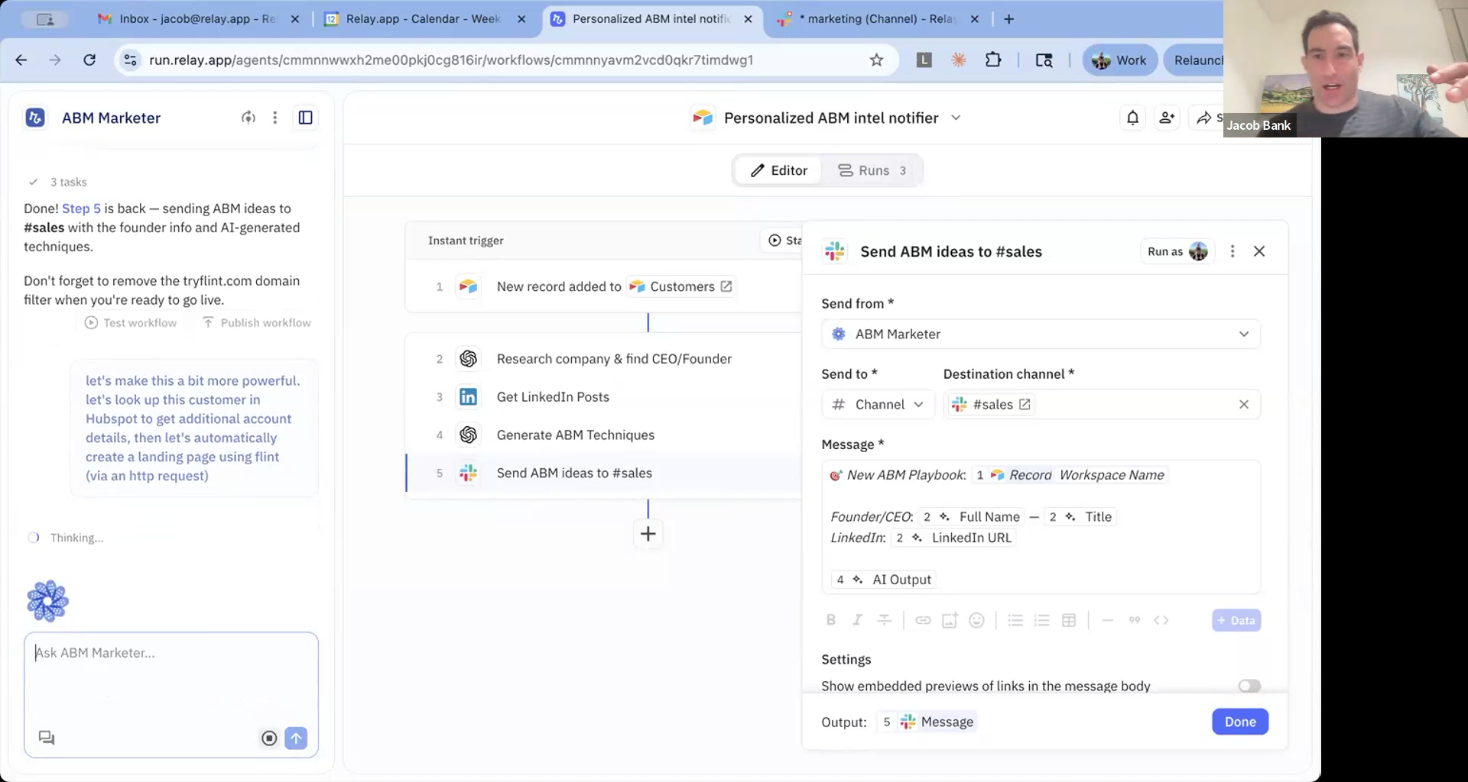
The workflow has 5 steps:
- 1.New record added to Customers (trigger from Attio)
- 2.Research company & find CEO/Founder
- 3.Get LinkedIn Posts
- 4.Generate ABM Techniques
- 5.Send ABM ideas to #sales
The AI chat on the left side suggests: "let's make this a bit more powerful. let's look up this customer in Hubspot to get additional account details, then let's automatically create a landing page using flint (via an http request)"
Note: Don't forget to remove the tryflint.com domain filter when you're ready to go live.
What you need
- •A Flint account (sign up at tryflint.com)
- •A Relay.app account (relay.app)
- •A CRM with your prospect records (Attio, HubSpot, or Salesforce)
- •A Slack workspace (for notifications)
Step-by-step setup
Follow these steps to set up automatic landing page generation for every new CRM record.
Step 1: Create your ABM page template in Flint
Sign up for Flint at tryflint.com. Create a landing page template designed for ABM outreach. This is the base design Flint will personalize for each new CRM record. Include dynamic sections for company overview, pain points, relevant use cases, and a CTA.
Once your template is ready, copy the page slug (e.g. /abm/template). Then go to https://app.tryflint.com/app/team to grab your Site ID and API Key.
Step 2: Set up the Relay.app trigger
In Relay.app, create a new workflow. Set the trigger to "New record added" in your CRM (Attio, HubSpot, or Salesforce). This fires every time a new prospect or company is added to your pipeline.
Step 3: Add research and enrichment steps
Add AI and integration steps to enrich the new record:
- 1.Research the company and find the CEO/Founder using AI
- 2.Pull recent LinkedIn posts from key contacts
- 3.Look up additional account details from your CRM (HubSpot, Attio, etc.)
- 4.Generate personalized ABM techniques and talking points using AI
These steps give Flint the context it needs to create a truly personalized page.
Tip: You can ask the Relay AI assistant to help build these steps for you. Just describe what you want to enrich and it will add the right integrations.
Step 4: Add the Flint HTTP request step
Add an HTTP request step to your Relay workflow that calls the Flint API. Configure it with:
- •Method: POST
- •Authorization: Bearer token with your Flint API key
- •Body: Include your Site ID, template page slug, and all the enriched data from the previous steps (company info, CEO details, LinkedIn posts, ABM techniques)
Flint takes all of this context and generates a personalized landing page for the prospect.
Tip: You can also ask the Relay AI assistant to set up this HTTP request for you. Just tell it you want to create a landing page using the Flint API and provide your credentials.
Step 5: Send results to Slack
Add a final step that posts to your sales team's Slack channel. Include the company name, founder info, ABM techniques, and the Flint landing page URL. Your team gets everything they need to run personalized outreach without doing any manual research.
Step 6: Test and publish
Run the workflow with a test record to make sure everything connects properly. Check that the Flint page generates correctly and the Slack notification includes the right info. Once it looks good, publish the workflow so it runs automatically for every new CRM record.
Tips for better results
- •The more enrichment steps you add (LinkedIn, CRM data, AI research), the better the Flint pages will be
- •Set up a filter to only trigger for high-value prospects (e.g. above a certain company size or funding stage) so you're not burning credits on low-priority records
- •Keep the Slack message structured so your team can quickly scan and act on each new prospect
